


AppOnFly VPS vs DatabaseMart VPS: Choosing the Right VPS for Your Needs
AppOnFly VPS, including AppOnFly Cloud and AppOnFly Windows VPS, provides fast, short-term Windows access. DatabaseMart VPS, as a reliable AppOnFly alternative, offers a broader range of Windows/Linux VPS and server options with flexible configurations and 24/7 support. This article compares their features, pricing, and use cases to help users make an informed choice.
Company Background
| Aspect | AppOnFly VPS | Database Mart |
|---|---|---|
| Founded | 2014 | 2005 |
| Headquarters | United States | United States |
| Core Services | Windows VPS, Cloud Desktop, App Streaming | VPS, Dedicated Servers, GPU Servers |
| Data Center Locations | US, EU | US-based data centers |
| Target Users | Individual users, freelancers, short-term Windows users | Small to midsize businesses, developers, Windows-heavy workloads |
Product Overview
| Product Aspect | AppOnFly VPS | DatabaseMart VPS |
|---|---|---|
| Infrastructure Model | Cloud-based, shared virtual infrastructure | Dedicated-resource VPS & performance-oriented |
| CPU Cores | Shared vCPU | Dedicated vCPU cores |
| Memory (RAM) | 1GB–16GB (plan-based) | 2GB–32GB+ (plan-based) |
| Disk Type | SSD (shared storage) | SSD / NVMe SSD |
| Disk Space | ~20GB–200GB (plan-based) | 60GB–320GB+ (plan-based) |
| Bandwidth | Unmetered | Unmetered |
| GPU Support | Yes (gaming / cloud gaming VPS) | Yes (GPU is available on GPU VPS plans) |
| CPU Resource Isolation | Shared | Dedicated |
| OS Support | Windows 10 VPS | Windows Server VPS, Linux VPS(Ubuntu, CentOS, Debian, etc.) |
| IP | Public Shared IP | Public Shared IP/dedicated IP (based on plan) |
| Access Method | Web browser (HTML5) or RDP | RDP (Windows) / SSH (Linux) |
| Root / Admin Access | Limited | Full Administrator / Root |
| Typical Workload Duration | Short-term, session-based | Long-running, 24/7 production workloads |
| Billing Model | Hourly per year (pay-as-you-go) or Fixed Monthly/Year fee | Monthly / multi-month subscription |
| Pricing Style | Usage-based | Fixed, predictable pricing |
| Primary Use Cases | Cloud desktop, gaming, testing, temporary tasks | Hosting, databases, enterprise apps, Windows-heavy workloads |
AppOnFly VPS — Pros & Cons
✅ Advantages of AppOnFly VPS
Fast and convenient deployment
AppOnFly VPS is built on AppOnFly cloud, offering instant provisioning with no complex setup. Users can access their AppOnFly Windows VPS directly from a web browser, making it highly convenient for quick tasks.Flexible, usage-based pricing
With hourly or monthly pay-as-you-go billing, AppOnFly VPS is cost-effective for short-term usage, testing, or temporary workloads where long-term commitment is unnecessary.Browser-based Windows experience
AppOnFly focuses on Windows-only environments, including AppOnFly Windows 10, allowing users to run Windows applications via HTML5 without relying solely on RDP clients.GPU support for interactive workloads
GPU-enabled instances are available and mainly optimized for cloud gaming, interactive graphics, and short-duration GPU workloads.
❌ Limitations of AppOnFly VPS
Shared infrastructure and vCPU resources
AppOnFly VPS uses shared vCPU and shared storage, which may lead to performance fluctuations during sustained or CPU-intensive workloads.Limited system control
Administrative privileges are restricted compared to traditional VPS platforms, making it less suitable for advanced system customization or server-side services.Shared public IP by default
AppOnFly VPS typically provides a shared public IP, which may not be ideal for SEO-sensitive, email, or production business applications.
DatabaseMart VPS — Pros & Cons
✅ Advantages of DatabaseMart VPS
Dedicated resources and stable performance
DatabaseMart VPS offers dedicated vCPU cores and stronger resource isolation, ensuring consistent performance for long-running, production workloads.Flexible OS support
Unlike AppOnFly, DatabaseMart VPS supports Windows Server and multiple Linux distributions, making it suitable for a wide range of technical use cases.Full administrative control
Users receive full Administrator or root access, enabling complete control over system configuration, security, and software deployment.Dedicated IP availability
Most DatabaseMart VPS plans typically include a public IP, with dedicated IP options available depending on the plan, which is important for hosting, SEO, and business-critical services.GPU VPS for Rendering & AI
DatabaseMart’s GPU VPS delivers stable, high-performance GPUs for emulator multi-instance workloads, rendering, live streaming, and AI inference, focusing on commercial and production use rather than direct gaming.
❌ Limitations of DatabaseMart VPS
Fixed billing model
DatabaseMart VPS uses monthly or multi-month subscriptions, which may be less cost-efficient for very short-term or temporary workloads compared to AppOnFly’s pay-as-you-go model. But this billing model is more cost-effective for 24-hour tasks.Requires more technical knowledge
Full system access and broader OS options mean DatabaseMart VPS is better suited for developers, businesses, and technical users rather than casual or non-technical users.
Price Comparison
| AppOnFly VPS Configuration | AppOnFly Pay as you go | AppOnFly Fixed Monthly Fee | DatabaseMart VPS Configuration | DatabaseMart Fixed Monthly Fee |
|---|---|---|---|---|
| 1 vCPU cores / 2 GB RAM / 50GB SSD / 10Mbps | $0.06/hour ($43.2/month) | $11.9/mo | - | - |
| - | - | - | 2 CPU Cores / 4GB RAM / 60GB SSD / 100Mbps | $8.99/mo |
| 2 vCPU cores / 8 GB RAM / 100GB SSD/ 100Mbps | $0.12/hour ($86.4/month) | $23.9/mo | - | - |
| 4 vCPU cores / 16 GB RAM / 250GB SSD/ 100Mbps | $0.24/hour ($172.2/month) | $46.9/mo | 6 CPU Cores / 12GB RAM / 180GB SSD / 200Mbps | $25.99/mo |
| RTX 5060 8 GB, AMD Ryzen 9 9950X (10 Cores), 16 GB RAM | - | $50/mo | 30GB RAM/16 CPU Cores/240GB SSD/200Mbps | $99/mo |
DatabaseMart VPS plans generally offer better value compared to AppOnFly. As a reliable AppOnFly alternative, they provide comparable or higher CPU performance and faster bandwidth—particularly for fixed monthly pricing. In contrast, AppOnFly’s pay-as-you-go rates are significantly higher, and even their monthly plans tend to cost nearly 50% more than DatabaseMart's.
In addition, DatabaseMart offers a broader range of VPS options, from entry-level plans up to 16 CPU cores, 32GB RAM, 400GB SSD, and 1Gbps bandwidth. The platform also supports 8 types of GPU VPS, making it suitable for a wide variety of workloads and performance requirements.
If you're ready to make the switch, here are two plans that are popular among new users:
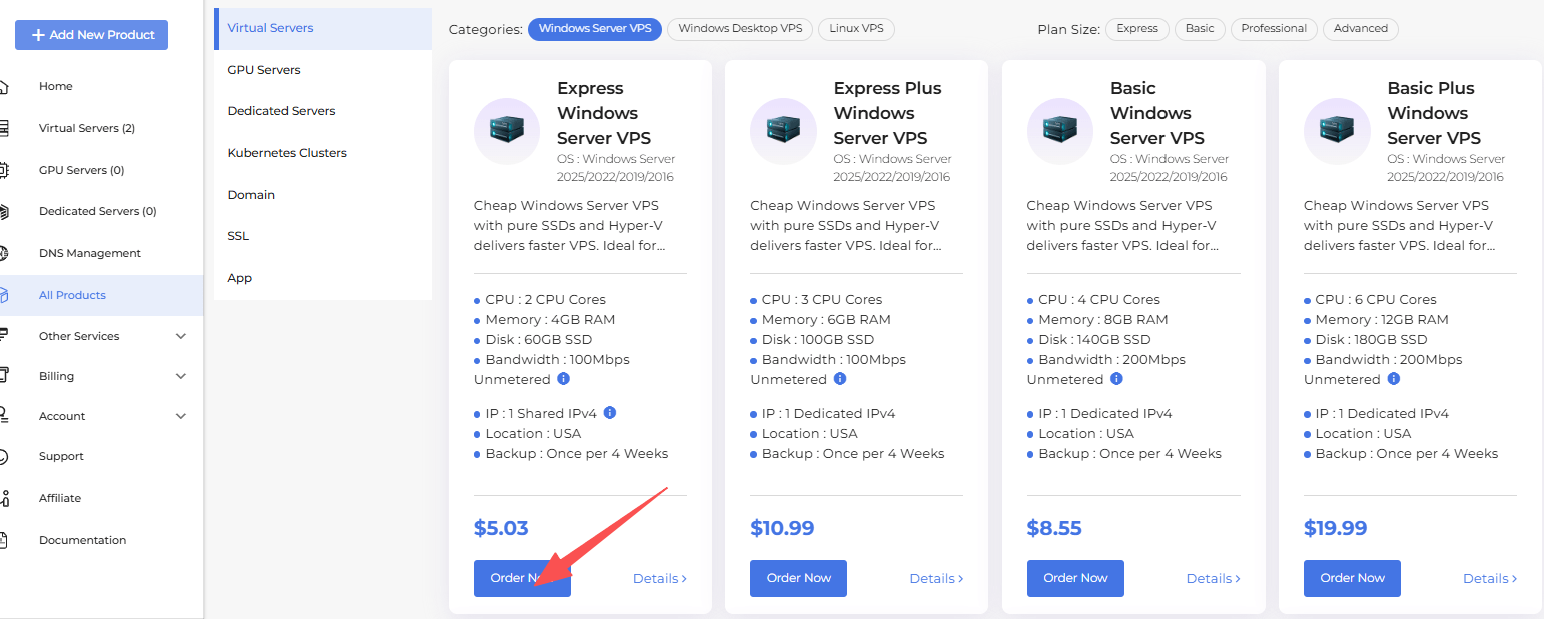
The Express Windows Server VPS is a great starting point — it comes with 4GB RAM, 2 CPU Cores, 60GB SSD storage, and 100Mbps unmetered bandwidth, more than enough for smooth remote desktop use. It includes a shared IP and automatic backups once every 4 weeks.
If you need more headroom, the Basic Windows Server VPS offers 8GB RAM, 4 CPU Cores, 140GB SSD, and 200Mbps bandwidth — a solid choice for heavier workloads or running multiple applications at once. It comes with a dedicated IP and automatic backups once every 4 weeks.
Both plans support Windows Server 2025/2022/2019/2016 with no setup fee.
VPS Management Console Comparison
| Console Feature | AppOnFly VPS | DatabaseMart VPS |
|---|---|---|
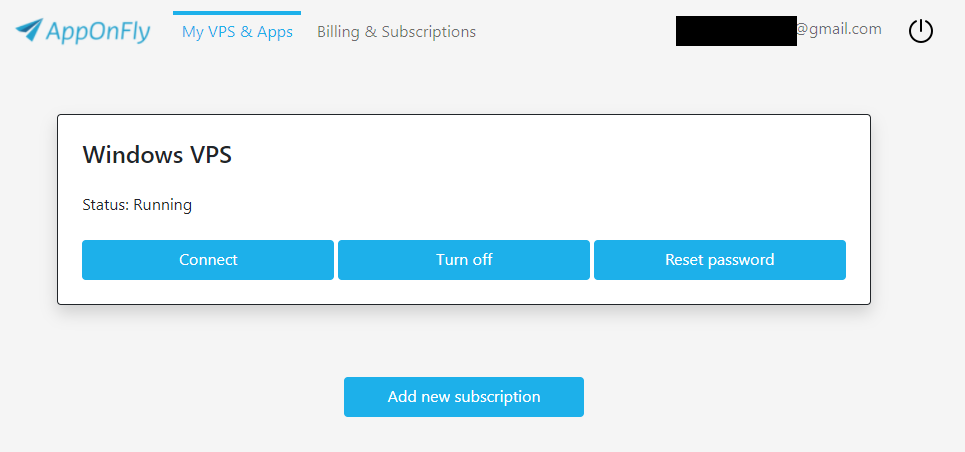
| VPS Control Panel | Simple web portal: start/stop/reset | Full VPS control panel: start/stop/reinstall OS/resource monitoring/upgrade |
| Resource Monitoring | Not provided | CPU/RAM usage charts available |
| OS Reinstall | Support Reset VPS to Factory Defaults | One-click reinstall |
| Main Focus | Quick desktop access | VPS lifecycle management + server configuration |
AppOnFly VPS Control Panel/Portal
 |
 |
|---|
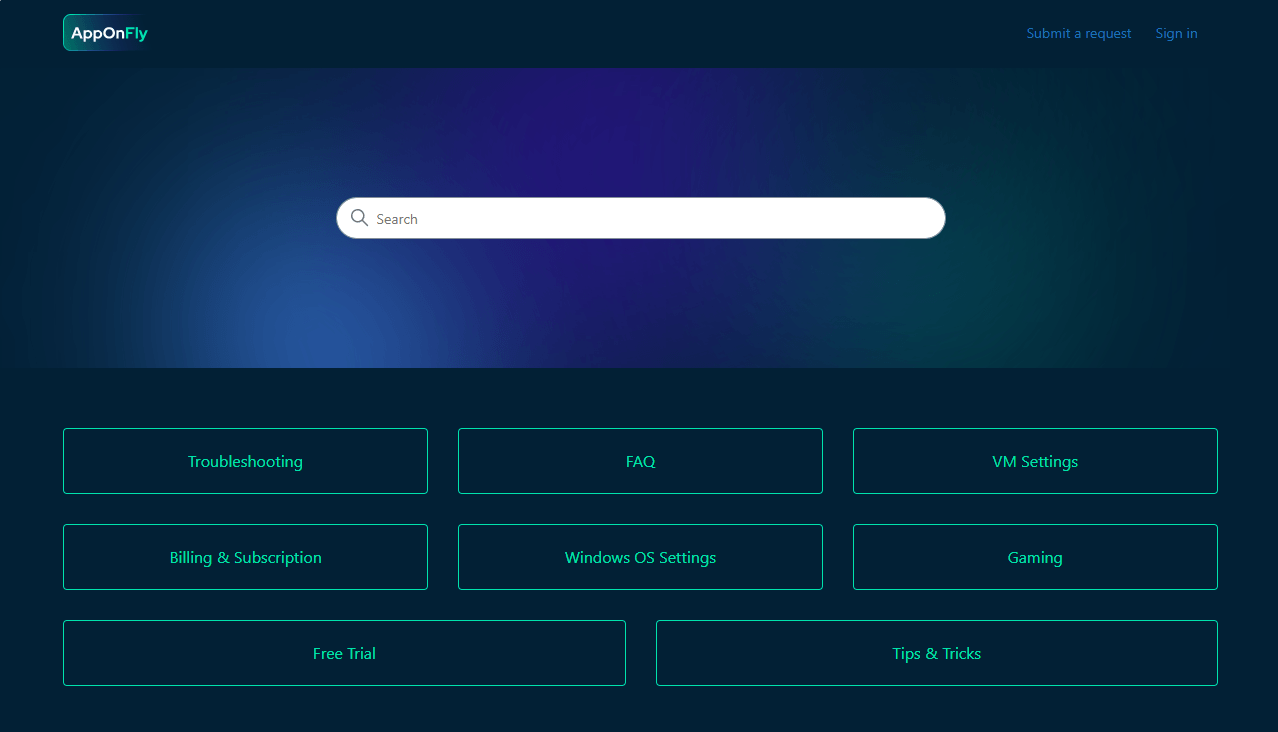
AppOnFly is designed for instant Windows VPS use with simple portal controls and RDP access; it does not offer a full server management console or in‑panel OS management beyond basic lifecycle actions.
Database Mart VPS Control Panel/Portal
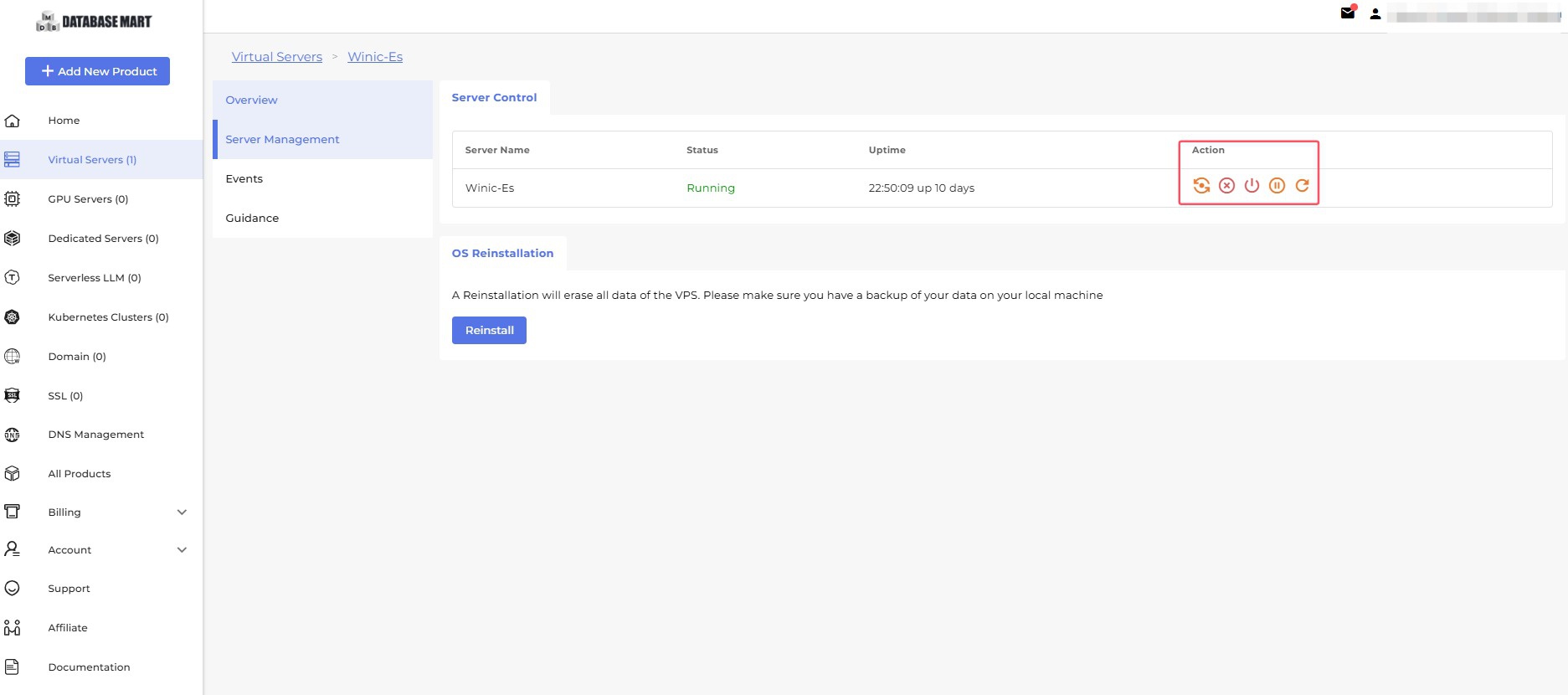
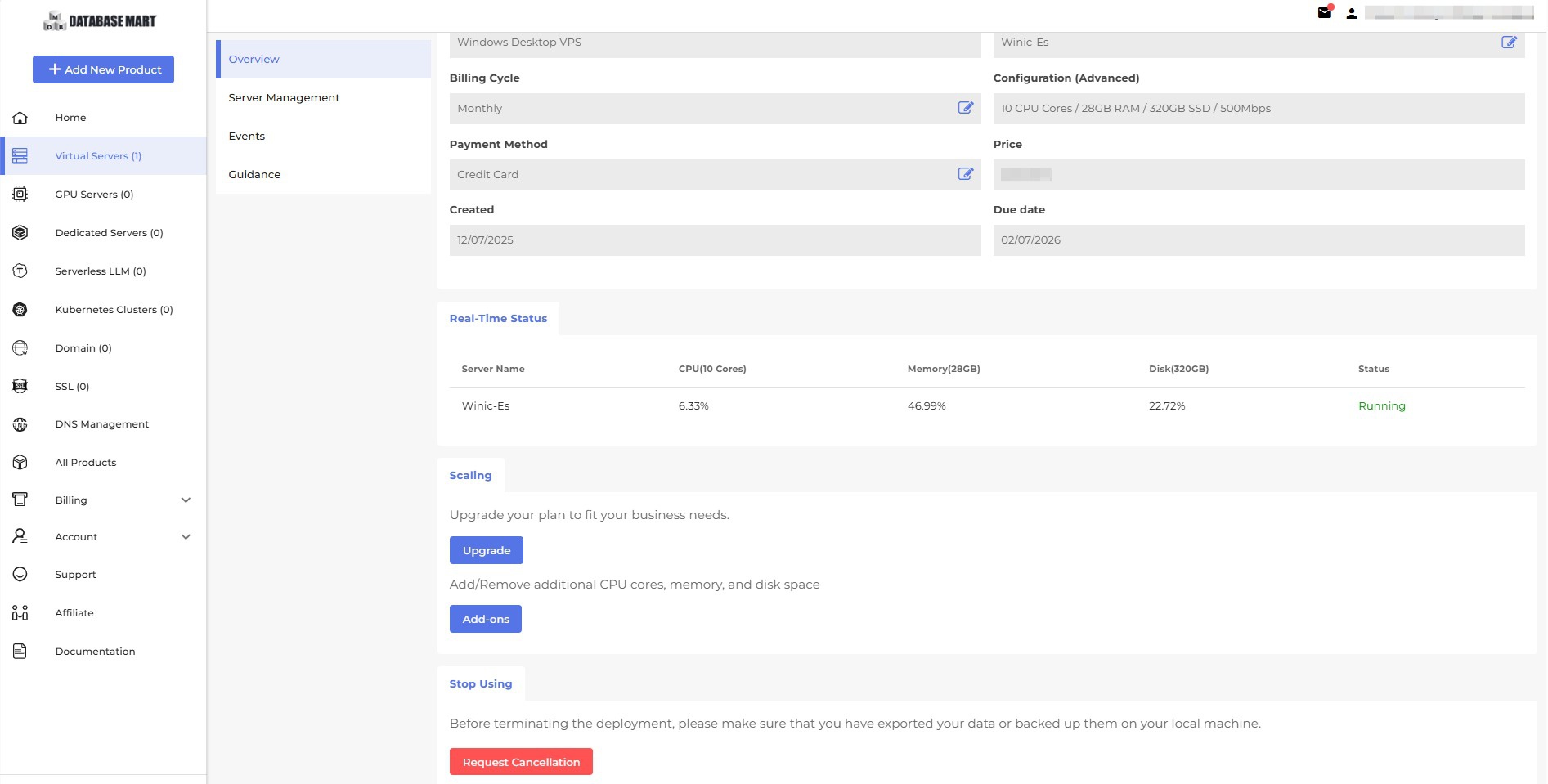
DatabaseMart offers a traditional VPS control panel that allows you to manage VPS operations (start/stop, reinstall, scaling, monitoring, and reset password) and support ordering additional services, such as domains and SSL. Additionally, via Database Mart control panel, you can easily check the VPS IP, port, basic configurations, and VPS events (timestamps).
Other Features Comparison
| Feature | AppOnFly VPS | DatabaseMart VPS |
|---|---|---|
| VPS Deployment Time | 30s to a few minutes | 10mins -2 hours |
| Hidden Fees | No hidden fees | No hidden fees; transparent monthly pricing |
| Product Variety | Mainly Windows VPS /RTX5060 VPS/Cloud Desktop | Windows VPS, Linux VPS, GPU VPS, Dedicated Servers |
| 24/7 Technical Support | 24/7 not guaranteed | Yes, full 24/7 technical support |
| Contact Methods | Ticket system | Live chat, email, ticket system |
| Response Time | Not guaranteed | Livechat within 5 minutes, ticket within 1-2 hours |
| Add-on Maximum | Limited customization; fixed configurations | Flexible add-ons (CPU, RAM, Disk, IP) with higher upper limits |
| Upgrade to Physical Server | Not supported | Yes, supports migration to dedicated servers |
| Typical Use Cases | Windows apps, cloud desktop, testing, short-term tasks | Web hosting, databases, development, automation, trading, AI, production workloads |
| Free Trial | 20 minutes trial access (Windows VPS only) for the lowest plan | 24 hours free trial available (VPS / dedicated server, approval required) |
Summary
- AppOnFly VPS focuses on speed and simplicity. AppOnFly Cloud can be deployed within seconds, making AppOnFly Windows VPS and AppOnFly Windows 10 suitable for short-term testing, cloud desktop access, and lightweight Windows applications. However, usage-based billing may lead to higher costs over time, limited scalability, and 24/7 support and response times are not guaranteed.
- DatabaseMart VPS is designed for long-term and production workloads, offering broader product options, flexible add-ons, guaranteed 24/7 technical support, faster response times, and the ability to upgrade from VPS to dedicated physical servers.
User Reviews Comparison
 |
 |
|---|
Overall Ratings
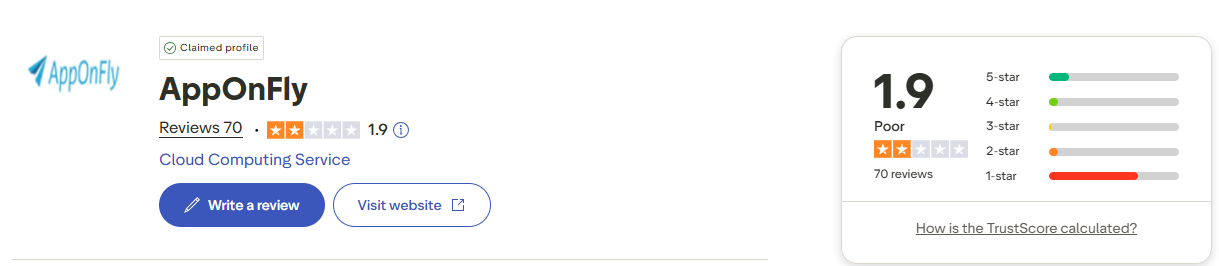
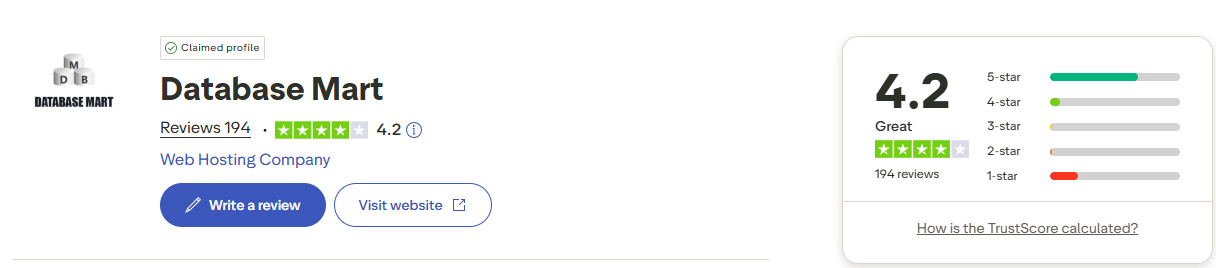
AppOnFly VPS only receives 1.9 scores on Trustpilot, with user feedback clearly polarized. DatabaseMart VPS maintains consistently higher ratings across major review platforms, usually reaching 4.2 to 4.8.
Positive Feedback Highlights
AppOnFly is praised for fast deployment and quick access to Windows cloud desktops. DatabaseMart is frequently commended for stable performance, flexible configurations, and responsive 24/7 technical support.
Negative Feedback Trends
AppOnFly users often report performance instability, limited trial time, and billing concerns for long-term use. DatabaseMart receives fewer negative reviews, mainly related to region-specific latency.
New to VPS? Here's How to Get Started (Free Trial Available)
Step 1 — Choose Your Plan
After registering, you'll be directed to our product page. We recommend starting with the Express Windows Server VPS — it's fully optimized for remote desktop use, so you can work on it just like your local PC.
Step 2 — Select Your Operating System
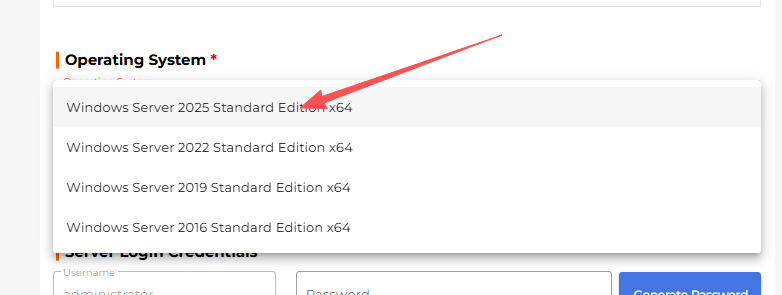
Under the OS selection, choose Windows Server 2025 Standard Edition (x64). This is our recommended option for the best compatibility and performance.
Step 3 — Set Your Password
Click Generate Password to create a secure random password — or enter your own. Make sure to save this password, as you'll need it later to log in to your server.
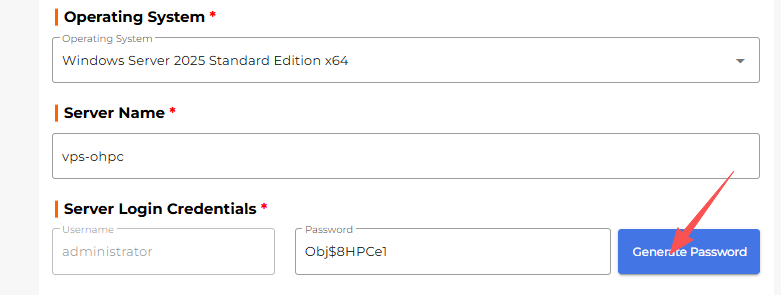
Step 4 — Choose a Billing Cycle
Select your preferred billing cycle. Monthly billing is selected by default. Once done, click the Check Out button on the right to proceed.

Once done, click the Check Out button on the right to proceed to payment.
If you'd like to purchase directly, you're all set! The steps below are for users who wish to apply for a 24-hour free trial before buying.
Want to Try Before You Buy? Here's How to Request a Free Trial
Step 5 — Add a Note for Your Trial Request
In the Note field at checkout, enter:
24 hour free trial for [your purpose]
Briefly describe what you plan to use the server for — this helps our team process your request faster.

Step 6 — Submit Your Order
Click Check Out to proceed to the next step.
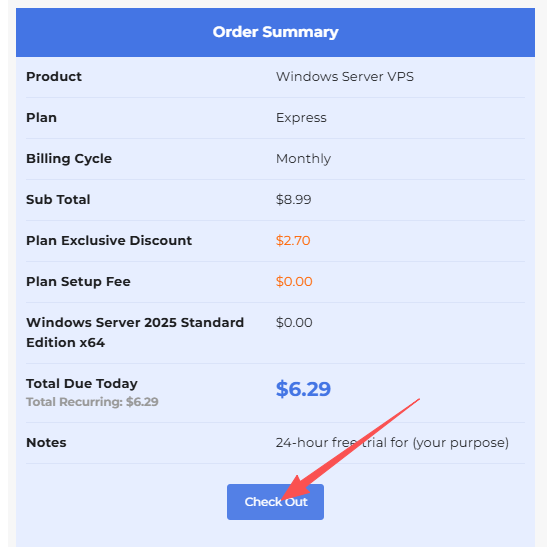
Step 7 — Submit Trial Request
If your billing details are incomplete, you'll be prompted to fill them in. Click the pencil icon next to Purchaser to add your information. Completing this step significantly improves your chances of trial approval.
Once done, click Submit Trial Request.

What Happens Next?
Our team will review your request — results are typically delivered within 30 minutes, and often in just a few minutes. If approved, you'll receive your login credentials via email, along with a tutorial on how to connect remotely.
Step 8 — Connect to Your Server via Remote Desktop
Once you receive your credentials, connecting is easy:
- Open Remote Desktop Connection on your local PC
- Enter the server IP address
- Use
administratoras the username- Enter the password you generated in Step 3
- Click Yes to confirm and connect — you're in!
📖 Need a detailed walkthrough? Visit our full guide:
How to Connect to a Windows Server Remotely →
Conclusion
AppOnFly VPS is ideal for quick deployment and web-based access, allowing users to start a Windows desktop almost instantly, and pause usage to stop billing when not in use. It is best suited for individuals or teams who need short-term, on-demand access to a Windows environment with minimal setup.
DatabaseMart VPS, as a reliable AppOnFly alternative, has a longer track record, stronger server stability, more robust management features, wider VPS options including Windows Server OS, and Linux support, as well as free 24/7 technical support. Its fixed monthly plans can reduce costs by over 50% for long-term users, making it suitable for businesses or developers who require reliable, scalable, and long-term VPS infrastructure for ongoing workloads or future growth.

databasemart VPS, apponfly alternative, apponfly, apponfly vps, apponfly cloud, apponfly windows vps, apponfly windows 10