


Google Compute Engine VPS vs DatabaseMart VPS – Who Wins?
Choosing the right VPS can be tricky when balancing cost, performance, and features. This guide compares Google Compute Engine VPS and DatabaseMart VPS, covering CPU, RAM, storage, bandwidth, GPU support, OS options, upgrade flexibility, backups, and control panel usability. Learn which provider fits your needs—scalable cloud instances or cost-effective, easy-to-manage VPS plans.
Company Background
| Aspect | Google Cloud | Database Mart |
|---|---|---|
| Founded | 2008 | 2005 |
| Headquarters | United States | United States |
| Core Services | Compute (Compute Engine, GKE, App Engine), Storage (Cloud Storage, Databases like Cloud SQL), Data & Analytics (BigQuery, Dataflow), and AI/ML | VPS, Dedicated Servers, GPU Servers |
| Data Center Locations | Datacenter locations all over the world | US-based data centers |
| Target Users | Freelancers, Large Enterprises, Mid Size Business, Small Business | Small to midsize businesses, developers, Windows-heavy workloads |
Hardware Comparison
| Feature | Google Compute Engine | DatabaseMart VPS |
|---|---|---|
| CPU | Customizable cores and architecture, choose high-performance or low-power instances (AMD EPYC, Intel Xeon), starting from 1 vCPU | Standard fixed CPU cores per plan (Intel Xeon E3-12xx v2, Ivy Bridge, IBRS), with option to add extra CPU at $2/month per core, upgrade limit 16 cores |
| RAM | Customizable memory size, starting from 1 GB RAM | Fixed per plan, can add extra memory at $2/month per GB, upgrade limit 32 GB |
| Storage | Choice of SSD size and type (Hyperdisk, Persistent Disk, Local SSD) | Fixed per plan, can add extra SSD at $2/month per 20 GB, added to C: drive, upgrade limit 400 GB |
| Network | Customizable network performance with bandwidth up to 200 Gbps, billed at $1.00 per hour | Standard port speed varies by plan, but offers unmetered bandwidth |
| OS | Linux or Windows | Windows Server / Linux / Windows Desktop |
| GPU | Supports GPU instances (optional) | GPU VPS Available |
| Customization | Highly customizable – CPU, RAM, Storage, and Bandwidth configurable | Fixed plan, but can add add-ons, upgrade VPS, or migrate from VPS to dedicated server |
Google Compute Engine VPS
Pros ✅
Fully customizable CPU (AMD EPYC/Intel Xeon), RAM, storage, and network bandwidth
Flexible GPU support and optional high-performance or low-power instances
Bandwidth up to 200 Gbps for demanding workloads
Ideal for advanced users who need precise configurations
Cons ❌
More complex setup, less beginner-friendly
Can get expensive with high-end configurations
Requires active management to optimize resources
DatabaseMart VPS
Pros ✅
Standardized plans simplify setup and management
Supports Windows Server, Linux, Windows Desktop, and GPU VPS
Options to add CPU, RAM, storage, or upgrade to dedicated servers
Cost-predictable and suitable for small to mid-size workloads
Cons ❌
Less flexible than Google VPS in core architecture and fine-tuned resources
Maximum upgrade limits (CPU 16 cores, RAM 32 GB, storage 400 GB)
Standard network speed may not meet extremely high-bandwidth demands
Price Comparison
Google Compute Engine Pricing Overview
Google Compute Engine (GCE) follows a usage-based, pay-as-you-go pricing model designed for maximum flexibility.
Free trial: $300 in free credit for new customers
Billing method: Credit card only
Billing granularity: Per-second billing (minimum 60 seconds)
Cost structure: You pay separately for:
- vCPUs
- Memory
- Storage (Persistent Disk / Local SSD / Hyperdisk)
- Network egress (outbound traffic)
While this model is highly flexible, cost estimation can be complex, especially for non-technical users. Although Google provides a pricing calculator, predicting final monthly costs can be difficult due to variable usage, network egress fees, and regional pricing differences.
Example:
e2-standard-4 (4 vCPU, 16 GiB RAM) in Asia-South1:
~$0.1340/hour
~$97.83/month (compute only, storage and bandwidth extra)
GCE is best suited for:
- Rapidly scaling workloads
- Projects with fluctuating resource demands
- Enterprises that need global infrastructure and long-term scalability
DatabaseMart VPS Pricing Overview
DatabaseMart VPS uses a fixed pricing model with clearly defined plans across multiple categories:
Each plan includes:
- Fixed CPU cores
- RAM
- SSD storage
- Unmetered bandwidth
- Dedicated or shared IP (depending on plan)
Example entry-level plans:
Express Linux VPS (2 CPU, 4 GB RAM, 60 GB SSD): $6.99/month
Basic Windows Desktop VPS (4 CPU, 8 GB RAM): $12.99/month
GPU VPS (GT730, 6 CPU, 8 GB RAM): $29.00/month
There are no usage-based surprises—storage, bandwidth, and IPs are included in the monthly price. Optional upgrades (CPU, RAM, disk) are available at fixed add-on rates.
DatabaseMart is best suited for:
- Budget-conscious users
- Predictable workloads
- Users who prefer simple, transparent billing
Pricing Model Comparison Summary
| Aspect | Google Compute Engine | DatabaseMart VPS |
|---|---|---|
| Pricing model | Pay-as-you-go | Fixed monthly plans |
| Cost predictability | Low–Medium | High |
| Billing complexity | High | Low |
| Bandwidth | Outbound Traffic is Billed. Charges apply to data leaving the Google Cloud environment (egress) | Unmetered |
| Entry cost | Higher for continuous use | Very low |
| Best for | Scaling & cloud-native workloads | Stable workloads & cost control |
Bottom Line:
Choose Google Compute Engine if you need elastic scaling, fine-grained control, and are comfortable managing complex cloud billing.
Choose DatabaseMart VPS if you want straightforward pricing, predictable monthly costs, and strong value for Windows, Linux, or GPU-based VPS hosting.
VPS Management Console Comparison
| 🛠 Aspect / Feature | ☁ Google Compute Engine (GCE) | 💻 DatabaseMart VPS |
|---|---|---|
| 🖥 Usability | ⚡ Powerful but complex; requires understanding of cloud concepts and instance configuration | ✅ Technical but straightforward; optimized for VPS users and server admins |
| 🔄 Server Lifecycle Management | ▶ Start / stop / reset instances from the VM instances list | ▶ Start / stop / restart VPS directly from the control panel |
| 💿 OS Reinstall / Recovery | ❌ No true one-click reinstall; achieved by replacing boot disks or using images/snapshots | ✅ True one-click OS reinstall available |
| 📈 Resource Scaling | 🔧 Flexible but manual; resizing CPU/RAM typically requires stopping the instance | ⚡ One-click upgrade of CPU, RAM, or storage without downtime |
| 📊 Resource Monitoring | 📈 Advanced monitoring via Cloud Monitoring (CPU, disk, network; memory via agent) | 📉 Real-time CPU and RAM usage charts built directly into the panel |
| 🔐 Security & Access Control | 🛡 IAM roles, service accounts, SSH key–based access | 🔒 Account security, 2FA, password control, server reset options |
| 🎯 Ideal Users | 👨💻 Developers and DevOps teams comfortable with cloud-style operations | 👩💻 VPS users and server admins who prefer fast, panel-based control |
Google Compute Engine Control Panel/Portal
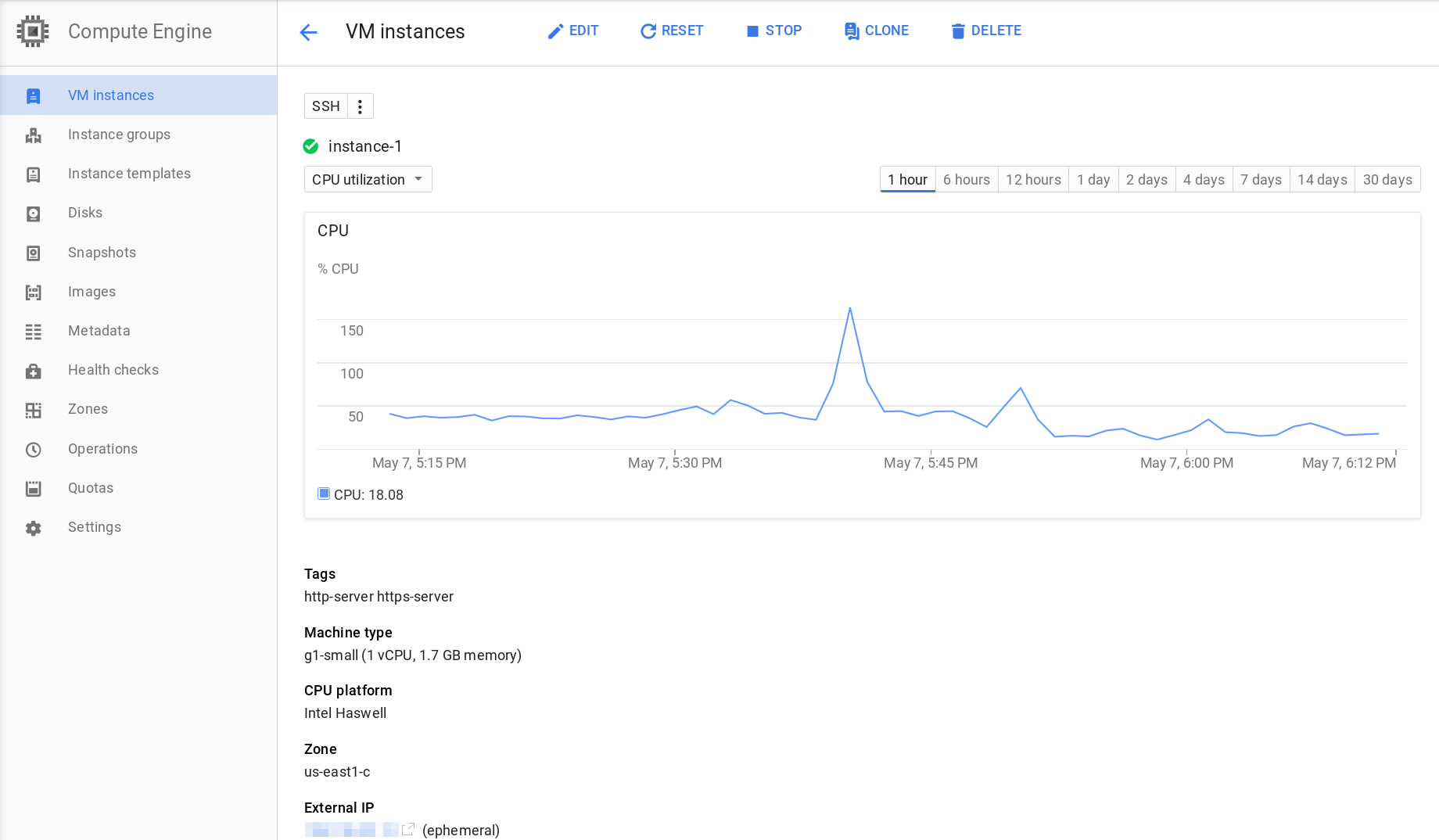
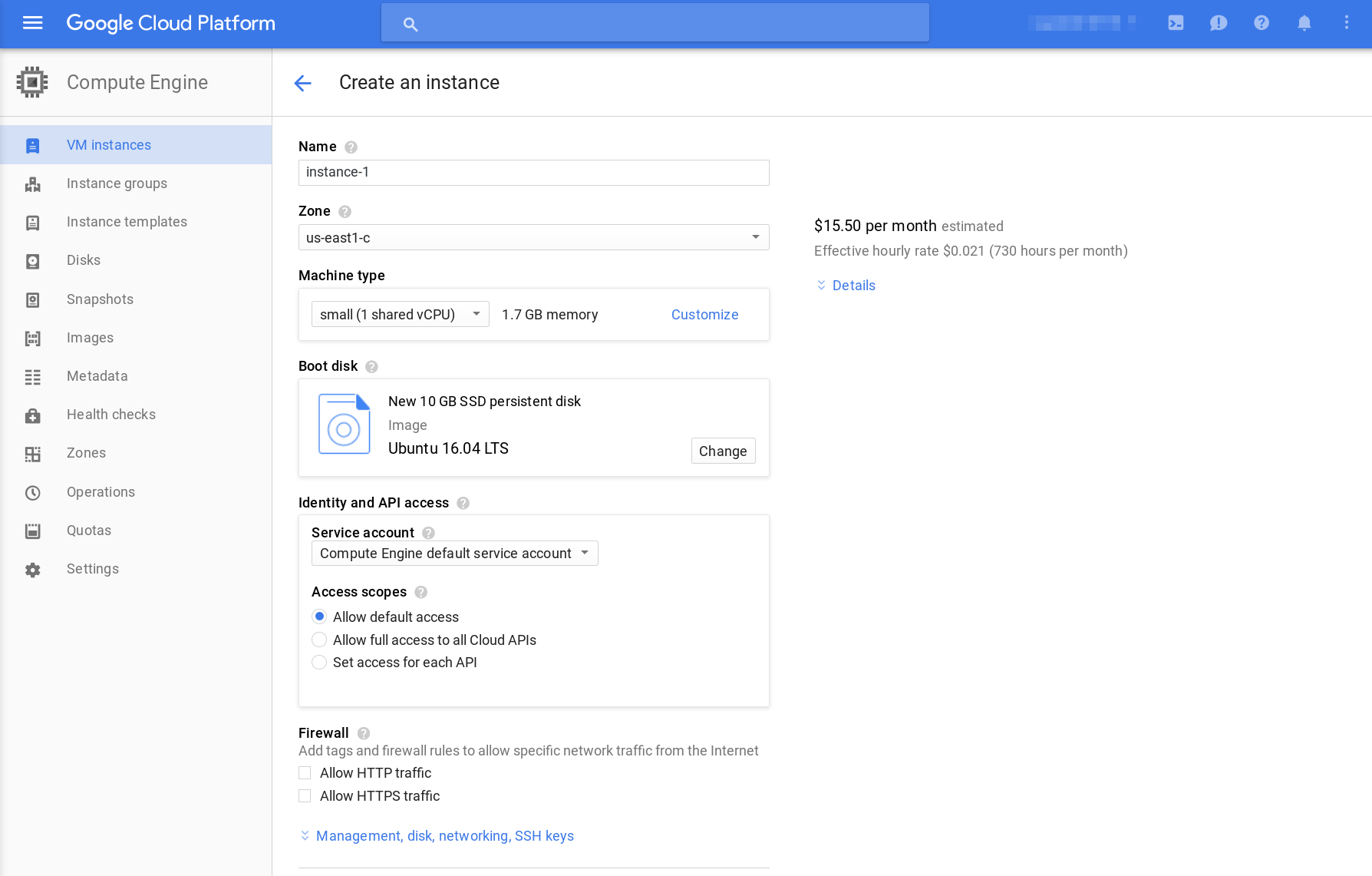
✅ Google Compute Engine: Offers granular cloud-style management—start/stop/reset VMs, adjust configurations, monitor resources—but most tasks like OS reinstall or scaling require manual steps and cloud knowledge. Best for developers and DevOps users.
Database Mart VPS Control Panel/Portal
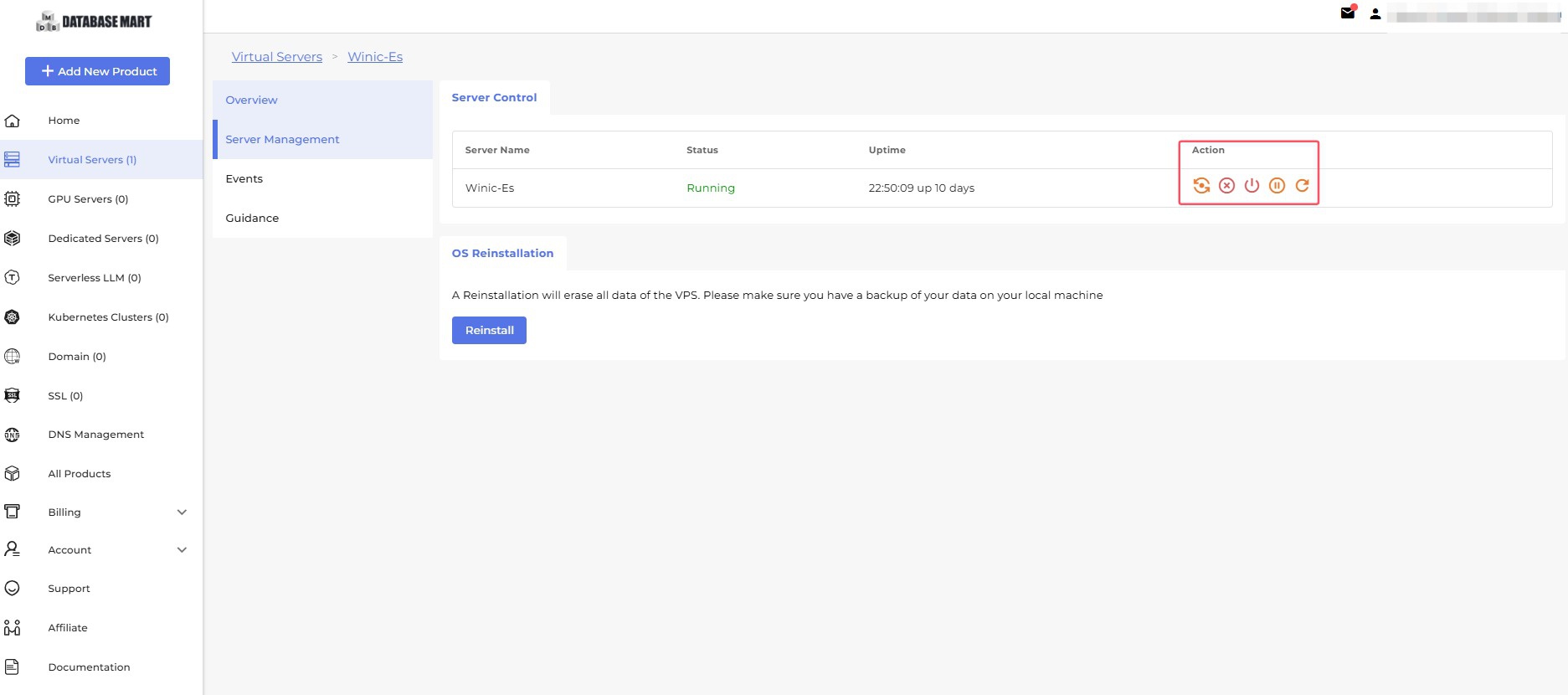
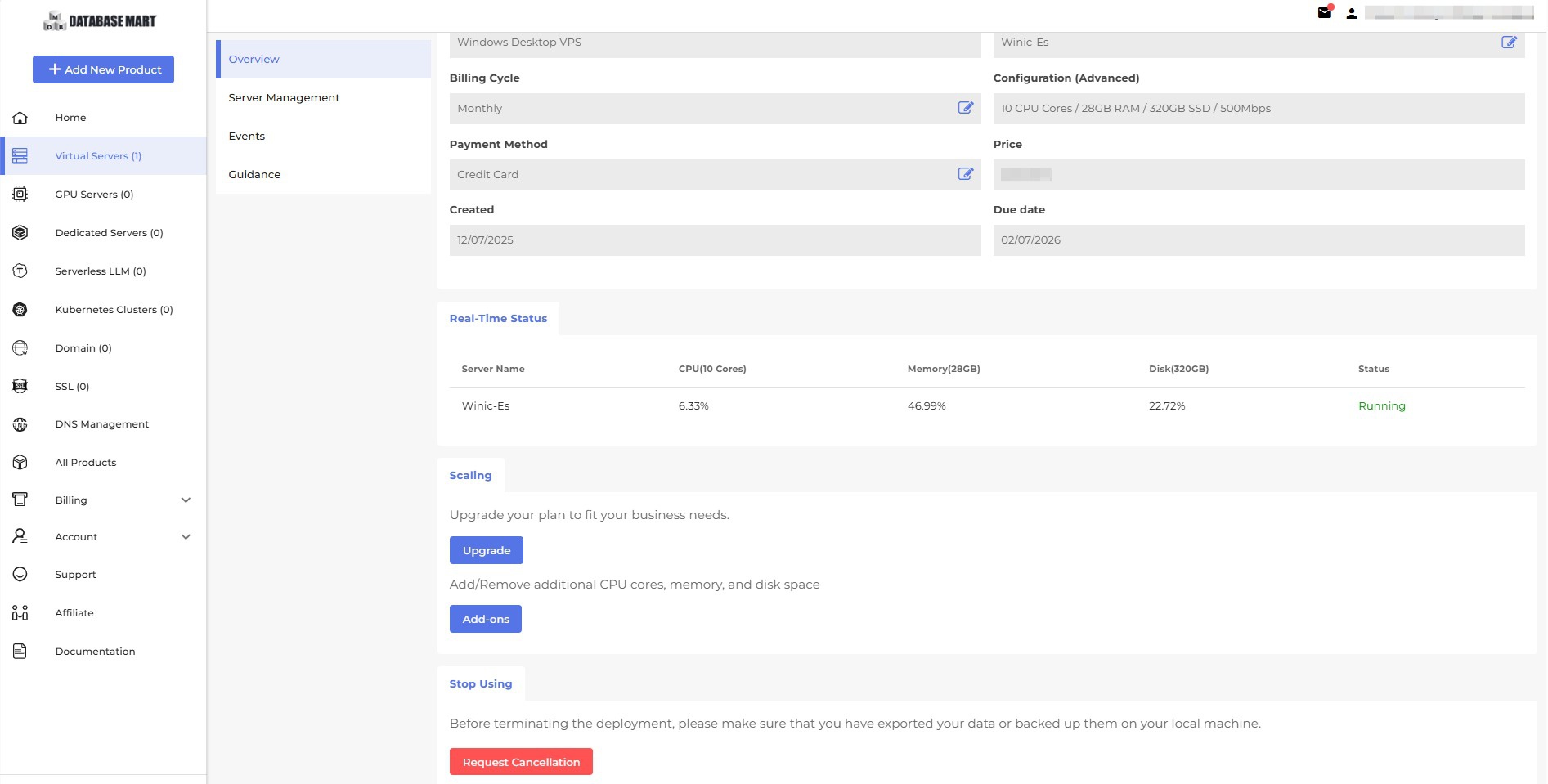
✅ DatabaseMart VPS: Focused on simplicity and VPS management—one-click OS reinstall, easy CPU/RAM/storage upgrades, real-time monitoring, and built-in security. Ideal for users wanting direct, hassle-free server control.
Other Features Comparison
| Feature | 💻 DatabaseMart | ☁ Google Compute Engine |
|---|---|---|
| 24/7 Technical Support | ✅ Yes | ⚠ Only for paid subscription |
| DDoS Protection | ✅ Yes | ✅ Yes |
| Backups | ✅ Yes | ❌ No |
| Contact Methods | ✉ Live chat, email, ticket system | ✉ Live chat, email, phone |
| SSH Keys Setup | ❌ No | ✅ Yes |
| Total Number of Datacenters | 2 | 42 |
| Number of Data Center Continents | 1 | 5 |
| Monitoring Charts | ✅ Yes | ✅ Yes |
| Admin REST API | ❌ No | ✅ Yes |
| Upgrade VPS from Admin Console | ✅ Yes | ❌ No |
| Mobile Friendly UI | ✅ Yes | ❌ No |
| Reverse DNS | ❌ No | ❌ No |
| Accepted Forms of Payment | 💳 Credit Cards, PayPal | 💳 Credit Cards |
| Affiliate Program | ✅ Yes | ❌ No |
Summary
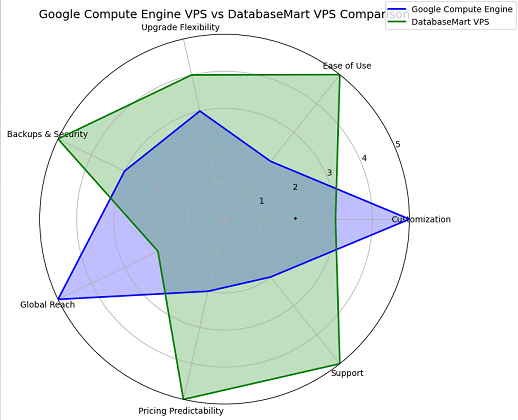
DatabaseMart prioritizes user-friendly VPS management with backups, 24/7 support, and easy upgrades, while Google Compute Engine offers global reach, advanced APIs, and cloud-native flexibility.
User Reviews
Google Cloud — Trustpilot Review Summary
Overall Rating: ~1.5/ 5 ⭐
👍Positive:
Scalability & Flexibility: Easy to scale VMs with custom configurations (CPU, memory, storage) and integrates well with other GCP services.
Cost Efficiency: "Pay for what you use" model and strong price-performance, with features like NVMe for high-speed needs.
Performance & Reliability: Excellent performance, strong SLAs, and high availability due to Google's global network and features like live migration.
👎Negative:
Billing Issues – unexpected charges, confusing pricing, no hard spending limits.
Poor Support – hard to reach, unhelpful, refunds difficult.
Data Reliability – lost photos/videos, sync problems.
DatabaseMart — Trustpilot Review Summary
Overall Rating: ~4.2 / 5 ⭐
👍Positive:
Service reliability and stability: Many reviews praise the VPS/cloud servers for being stable, fast, and having minimal downtime or interruptions.
Customer support: Several reviews highlight responsive, helpful, and knowledgeable support, including assistance with setup, troubleshooting, and payment issues.
Pricing and value: Some reviews note that Database Mart offers competitive, affordable pricing for the features and performance provided.
Ease of use: A few reviews mention quick setup, user-friendly control panels, and clear management interfaces.
Overall experience and trust: Multiple reviews express satisfaction with long-term service, confidence in the provider, and willingness to continue using or recommend Database Mart.
👎Negative:
Verification or account issues: Some negative reviews mention excessive or confusing identity verification requirements, creating friction for users.
Setup or usability difficulties: A few reviews note that initial server setup or control panel operations are not very intuitive, though these issues can usually be resolved.
Price and value concerns: Some reviewers feel the pricing is high relative to performance, even if the service remains usable.
Conclusion
Google Compute Engine VPS
- Best for users needing global infrastructure, cloud-native flexibility, and customizable resources.
- Offers advanced features like GPU support, high bandwidth, and API integrations.
- Complexity and variable costs make it better suited for experienced developers or DevOps teams.
DatabaseMart VPS
- Ideal for small to mid-size workloads with predictable pricing and straightforward management.
- Provides easy upgrades, backups, 24/7 support, and user-friendly control panels.
- Less flexible in CPU/RAM scaling and network options but simpler and more cost-effective.
databasemart VPS, google cloud alternative, google compute engine pricing, google compute engine, google cloud vps, google vps hosting, vps provider comparison